Samsung has officially kicked off the holiday season for Galaxy enthusiasts with the surprise announcement of the Samsung One UI 8.5 Beta program.
Traditionally, mid-cycle updates (the “.5” versions) were reserved for foldable launches, but Samsung is breaking tradition this year by skipping version 8.1 and moving straight to a feature-packed 8.5 release for its primary flagship lineup.
Based on Android 16, One UI 8.5 is far more than a minor incremental patch.
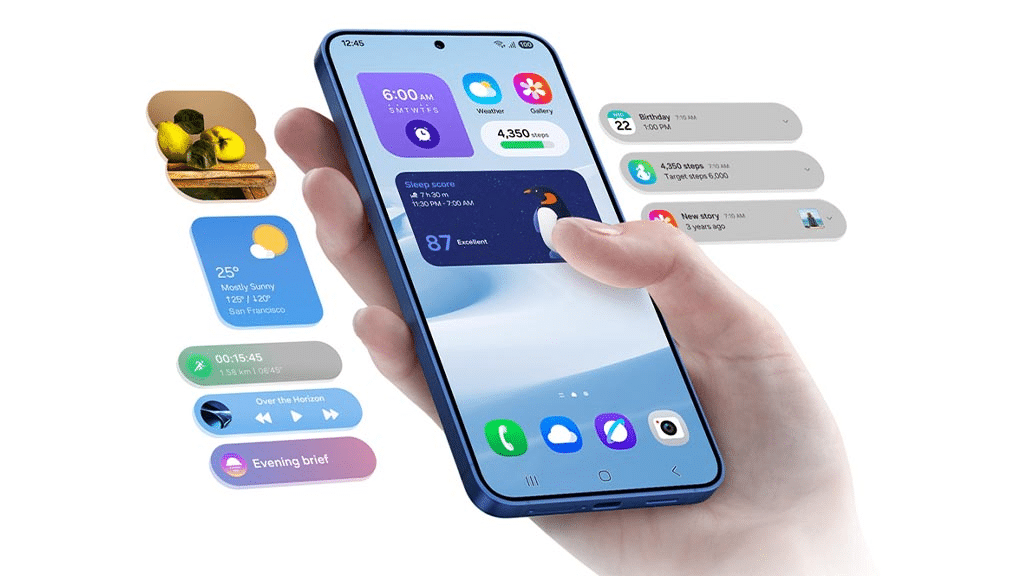
It introduces significant overhauls to the user interface, deeper integration of Galaxy AI, and a robust suite of cross-device connectivity features that bridge the gap between smartphones, PCs, and tablets.
Announcement Date and Global Availability
Samsung officially pulled the curtain back on the One UI 8.5 Beta on December 8, 2025. The program is designed to allow power users to test the software’s stability before it becomes the default operating system for the upcoming Galaxy S26 series in early 2026.
Supported Regions
The beta program is currently live in six key markets:
- United States
- United Kingdom
- South Korea
- Germany
- India
- Poland
Eligible Devices: Galaxy S25 Leads the Way
At launch, the beta is exclusively available for the Galaxy S25 series, including the Galaxy S25, S25+, and S25 Ultra. While the Galaxy S24 and S23 series, alongside the newer Z Fold and Flip models, are expected to join “Phase 2” of the beta in later, they are not yet part of the initial rollout.
One UI 8.5 Content Creation: The Evolution of Photo Assist
One UI 8.5 places a massive emphasis on “Continuous Creativity,” leveraging AI to remove friction from the editing process.
Continuous AI Editing
The standout feature is the updated Photo Assist. Previously, users had to save each AI-generated change before trying another.
Now, Photo Assist supports Continuous Edits with Edit History.
You can generate multiple AI iterations, scroll back through your history to compare versions, and only save the final masterpiece.
Smarter Quick Share
Sharing is now context-aware. Using facial recognition, Quick Share can now identify friends or family members within a photo you just took and proactively suggest sending the image directly to them.
This eliminates the need to manually browse your contact list.
Connectivity: Storage Share and Auracast 3
Samsung is doubling down on its ecosystem, making your phone a central hub for all your hardware through a new suite of connectivity tools.
- Storage Share: Integrated into the My Files app, this feature allows you to browse and manage files stored on your Galaxy tablets, PCs, and even Samsung Smart TVs directly from your phone.
- Auracast Voice Broadcast: Building on Bluetooth LE Audio, users can now broadcast their own voice using the phone’s built-in microphone to nearby supported headphones or speakers. Samsung is pitching this as the perfect tool for impromptu group tours or events.
- Seamless Hotspot Hand-off: Moving between a phone and a Galaxy Book laptop is now instantaneous, with smarter network sharing that requires zero manual toggling.
Security and Privacy: Theft Protection 2.0
With cyber threats becoming more sophisticated, One UI 8.5 introduces some of Samsung’s most aggressive security measures to date.
Failed Authentication Lock
A major addition to the security suite is the Failed Authentication Lock.
If the device detects too many failed attempts to verify identity via fingerprint, PIN, or pattern, it will automatically enter a high-security lockdown mode.
This prevents “brute force” attempts and requires secondary cloud-based verification to regain access.
Enhanced Identity Check
Samsung has expanded Identity Check to safeguard more system settings.
Critical changes—such as disabling “Find My Mobile” or altering biometric data—now require an additional layer of authentication, ensuring that even if a phone is unlocked, sensitive settings remain protected.
UI Overhaul and Productivity
The interface receives a “Material 3 Expressive” touch, focusing on reachability and deeper customization.
- Customizable Quick Panel: The Quick Settings panel is now fully modular. Users can resize, move, or delete almost any toggle or slider, allowing for a truly one-handed layout.
- Subject-Aware Lock Screens: When setting a photo of a person or pet as a wallpaper, the system uses AI to place the clock behind the subject, creating a premium depth effect.
- AI Routines: New “Ask Gemini” and “Ask Bixby” actions have been added to Modes and Routines, allowing for complex automation like “Summarize my morning emails as soon as my 7 AM alarm is dismissed.”
How to Join One UI 8.5 Beta?
If you own a Galaxy S25 series device in a supported region, you can join the program today:
- Open the Samsung Members app.
- Log in with your Samsung Account.
- Tap the One UI 8.5 Beta Program banner on the home screen.
- Once registered, navigate to Settings > Software update > Download and install.